
Can I file overtime for work rendered on a rest day?
Yes. File a single overtime request for the rest day — no schedule adjustment, no separate rest-day worked form. OneHRIS reads the rest-day flag from the employee's shift assignment and applies the DOLE rest-day premium and the rest-day overtime premium on top automatically.
The short answer
Yes. For OT rendered on a rest day:
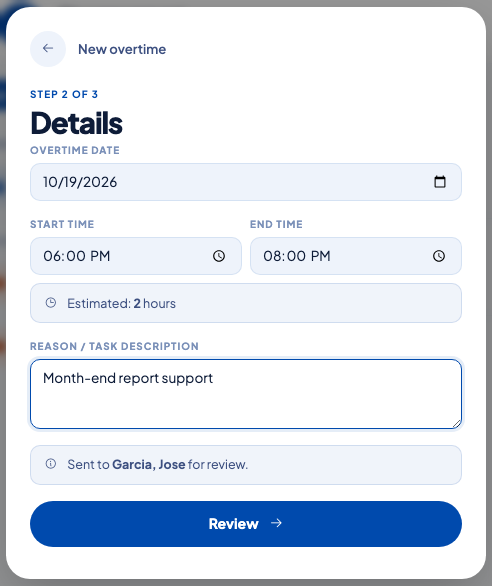
- The employee files one overtime request for the rest-day date in the Employee Portal — same screen as any other overtime request.
- The approver approves it.
- Payroll applies the rest-day premium to all hours worked that day and adds the rest-day overtime premium to the hours past the eighth.
There is no schedule adjustment form, no separate rest-day worked declaration, no checkbox to open a padlock on. The employee's assigned work schedule tells OneHRIS which days are rest days; the attendance punch tells it that work happened; the overtime request tells it that it was planned work above eight hours.
The rates OneHRIS applies
| Scenario on the rest day | Rate on the first 8 hours | Rate on hours past 8 (overtime) |
|---|---|---|
| Ordinary rest day | 130% of the regular hourly rate | 130% hourly rate + 30% overtime premium on top |
| Rest day on a Special Non-Working Day | 150% of the regular hourly rate | 150% hourly rate + 30% overtime premium on top |
| Rest day on a Regular Holiday | 260% of the regular hourly rate | 260% hourly rate + 30% overtime premium on top |
Night differential of 10% between 10 PM and 6 AM applies on top of the appropriate rate when the overtime falls in that window. See cross-midnight shift: how hours are split across days for how OneHRIS splits a shift that crosses midnight.
What tells OneHRIS it is a rest day
The source of truth is the shift assignment for that employee on that date. Set up the standard work schedule under Attendance, then Schedules, and tag the rest days in the weekly pattern. The rest-day flag follows every attendance record created for that date — including DTR uploads, biometric punches, and manual entries.
If an employee has a rotating rest day, assign the shift for the week before the week starts. The rest-day premium is driven by the assignment that is active on the date worked, not by the current week's assignment.
See assign shifts in bulk with the Weekly Planner for the fast way to tag rest days across a team.
When pre-approval is required
The Overtime Policy controls whether an overtime request needs the supervisor's approval before it is paid. The same rule applies on a rest day as on a workday — the premium multiplier changes, the approval workflow does not. See file and approve overtime for the full approval flow and the policy settings.
If the employee came in on their rest day without a pre-filed overtime request, the hours surface as unapproved overtime on the OT Discrepancy screen. HR converts those hours into an approved request before the payroll run so the rest-day rates apply. See unapproved overtime and extra hours.
Common mistakes
- Filing a leave for the rest day because the employee worked from home. A rest day worked is not a leave day — file an overtime request for the hours, not a leave application. If an attendance record is missing because of a WFH day, file a DTR correction. See fix missing or wrong time logs.
- Expecting a schedule adjustment to appear. OneHRIS does not require one. If you came from a system that did, the overtime request alone replaces that whole flow for the rest-day scenario.
- Not updating the schedule when the rest day rotates. The rest-day premium is driven by what the schedule said on the date worked. A late update to this week's assignment does not retroactively pay rest-day rates for last week unless the attendance for that period is recomputed.
Questions people ask
Do I file a schedule adjustment first before the overtime?
No. OneHRIS does not use a separate schedule adjustment form for rest-day work. The attendance punch on that date is the evidence of work, and the overtime request covers the hours above the standard eight. The rest-day flag comes from the employee's assigned work schedule, not from a one-off adjustment.
What rate applies for the first eight hours on a rest day?
130% of the regular daily rate — the DOLE rest-day premium. OneHRIS applies this automatically when the attendance date is marked as a rest day in the schedule.
What rate applies for overtime past the eighth hour on a rest day?
The rest-day hourly rate plus a 30% overtime premium on top of that rate. On a rest day that is also a regular holiday the base multiplier is 260%, and the overtime premium is added on top of the resulting hourly rate.
What if the employee works a full shift on their rest day but no overtime?
Still a single rest-day attendance record. No overtime request is needed if the hours stay within the normal eight-hour day. Payroll will apply the 130% rest-day premium to all hours worked that day.
What if the rest-day flag on the schedule is wrong?
Fix the shift assignment for that date under Attendance then Schedules, and recompute attendance for the affected pay period. The article on recalculating attendance after a schedule change covers the exact steps.
Sources
- Labor Code of the Philippines, Article 93, rest day work
- Labor Code, Article 87, overtime work
- DOLE, Handbook on Workers' Statutory Monetary Benefits, premium pay