
Late overtime filing and retroactive requests
By default an employee cannot file overtime for a date that has passed. HR can allow retroactive filing and limit it to a number of hours after the overtime date.
The default rule
Overtime has to be filed for today or a future date. An employee who tries to file for a date that has passed sees this message and the request is not created.
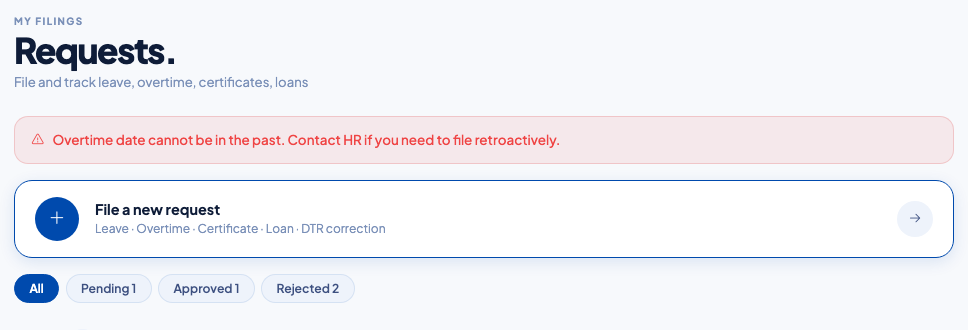 "Overtime date cannot be in the past. Contact HR if you need to file retroactively."
Allow a filing window
- Open Settings, then Policies, then Overtime Policy.
- In Retroactive Filing, turn on Allow retroactive OT filing.
- Enter the number of hours after the overtime date during which filing is still allowed. For example, 48 means an employee can file up to two days after the overtime date.
- Select Save Policy.
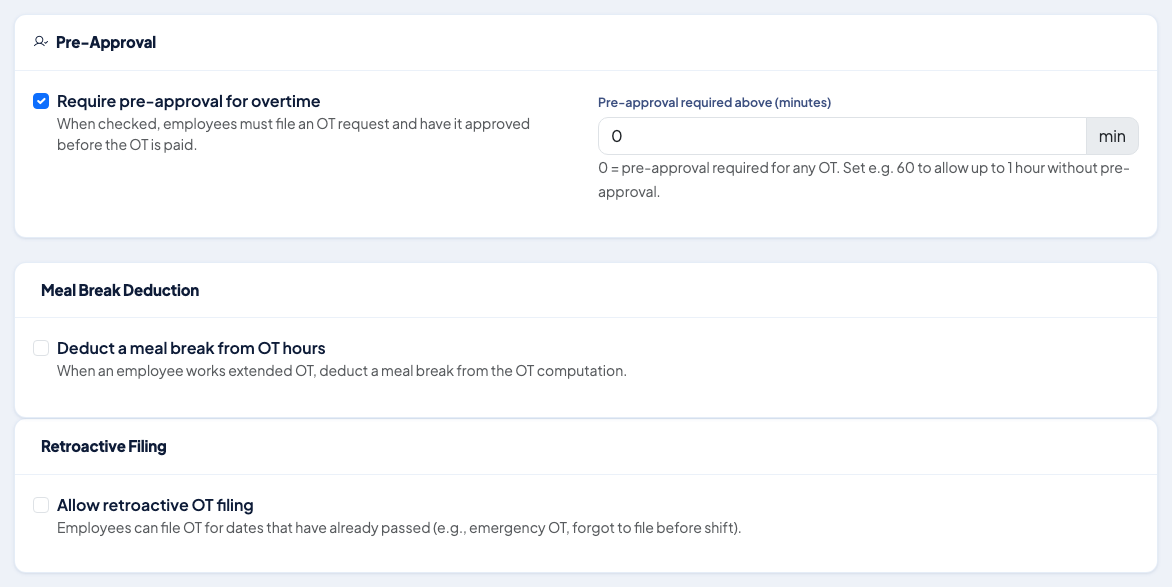 Pre-approval, meal break deduction and retroactive filing in one policy.
Inside the window the request goes through approval like any other. Outside it, the employee sees: "Retroactive OT filing is only allowed within 48 hours of the OT date. This date is too far in the past."
Recommended practice
- Choose the window to match your payroll cut-off, so overtime filed late can still be approved before payroll runs.
- Keep the daily, weekly and monthly caps on, because retroactive requests are checked against them too.
- Review Overtime History before each payroll run for requests that are still pending.
Questions people ask
What happens when an employee files overtime after the date?
With the default policy the request is refused with the message "Overtime date cannot be in the past. Contact HR if you need to file retroactively."
How do we allow late filing?
Turn on Allow retroactive OT filing in the Overtime Policy and set how many hours after the overtime date an employee may still file.
What if the filing window has passed?
The employee sees that retroactive filing is only allowed within the set number of hours and that the date is too far in the past.
Do retroactive requests still need approval?
Yes. They follow the same approval workflow and policy checks as any other overtime request.