
Duplicate biometric punches
Every punch from a biometric device is stored, and for each employee and day OneHRIS keeps the earliest time in and the latest time out, so repeated or re-sent punches do not change the attendance record.
Available on Enterprise
How punches are received
A small agent installed next to the biometric device sends punches to OneHRIS. Each agent uses an API key that HR generates under Settings, then Attendance, then Biometric Sync API Keys.
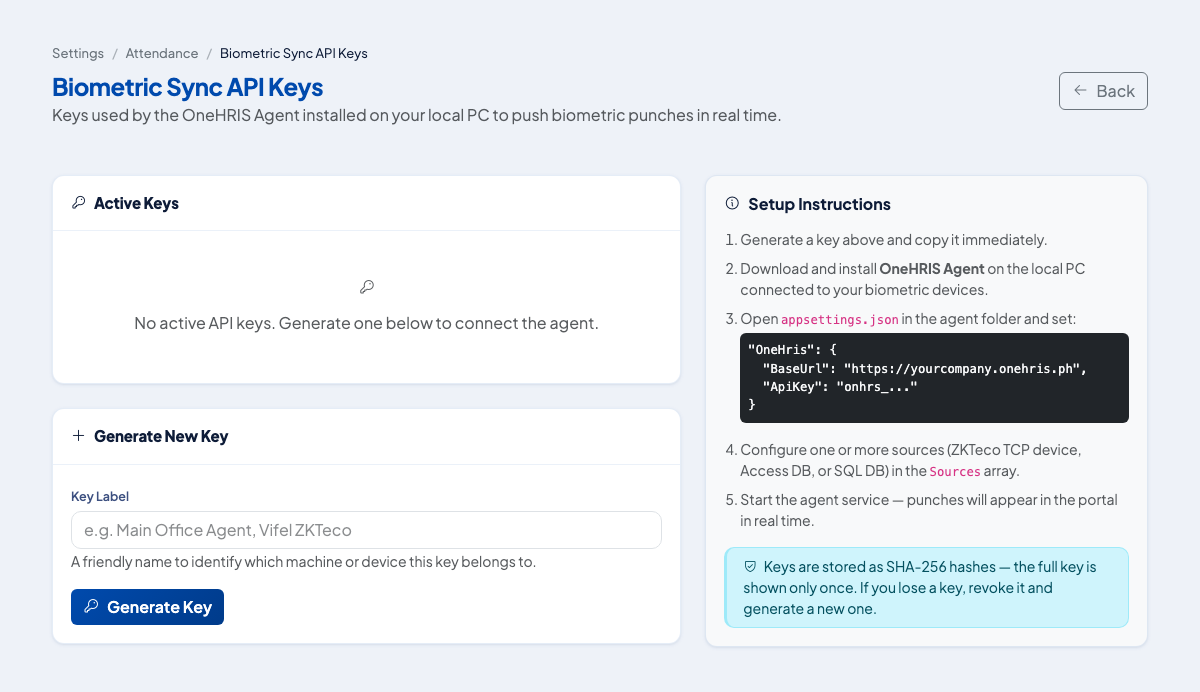 Generate a key, label it with the device or office, and revoke it if it is lost.
Each punch carries the employee's biometric code, the time, the device and, where the device provides it, whether it is an In or an Out.
How duplicates are handled
| Situation | Result |
|---|---|
| Two In punches in a row | The earlier time stays as the time in |
| Two Out punches in a row | The later time stays as the time out |
| Several In punches and no Out | The record has a time in and no time out, so it shows as incomplete |
| The same batch uploaded twice | No change to the attendance record |
| An Out with no In for the day | Stored in the punch log. It does not create an attendance record on its own. |
| Two scans within a minute from a device that sends no In or Out | The second is ignored, so the record stays open until the real time out |
| A biometric code with no employee | Stored in the punch log and reported as rejected |
Because every punch is kept in the punch log, you can trace what the device sent even when the attendance record shows only one time in and one time out.
Finish an incomplete record
When there is a time in and no time out, the employee files a correction, or HR enters the time. See Fix missing or wrong time logs.
Questions people ask
What happens when an employee punches in twice?
The earliest time in for the day is kept.
What happens when an employee punches out twice?
The latest time out for the day is kept.
What if a device sends the same punches again after a network problem?
The attendance record is unchanged, because the earliest in and the latest out are the same.
What if a punch belongs to an employee who is not set up?
The punch is stored, reported back as rejected with the biometric code, and not applied to any attendance record.
What if a device sends only a time and no In or Out?
The first punch of the day becomes the time in and a later punch becomes the time out. A second scan within one minute of the time in is treated as the same scan repeated and is ignored. Set the device to send In and Out where it can.