
Set up leave types and leave policies
Leave types define what each kind of leave is called and how it accrues. Entitlement rules set how many days each type of employee gets, and filing rules control how leave is requested.
Available on Pro Enterprise
Create a leave type
- Go to Settings and open Leave Types & Configuration. The page is titled Leave Configuration.
- Select Add Leave Type.
- Enter the Leave Code and Leave Name, for example VL and Vacation Leave.
- Set Max Days Per Year.
- Choose the Accrual Method: Lump Sum (granted annually) or Monthly Accrual. For monthly accrual, enter the Accrual Rate. Turn on Use Progressive Accrual (Tenure-Based) if the entitlement grows with years of service.
- Turn on Paid Leave and Convertible to Cash as the leave requires.
- Save.
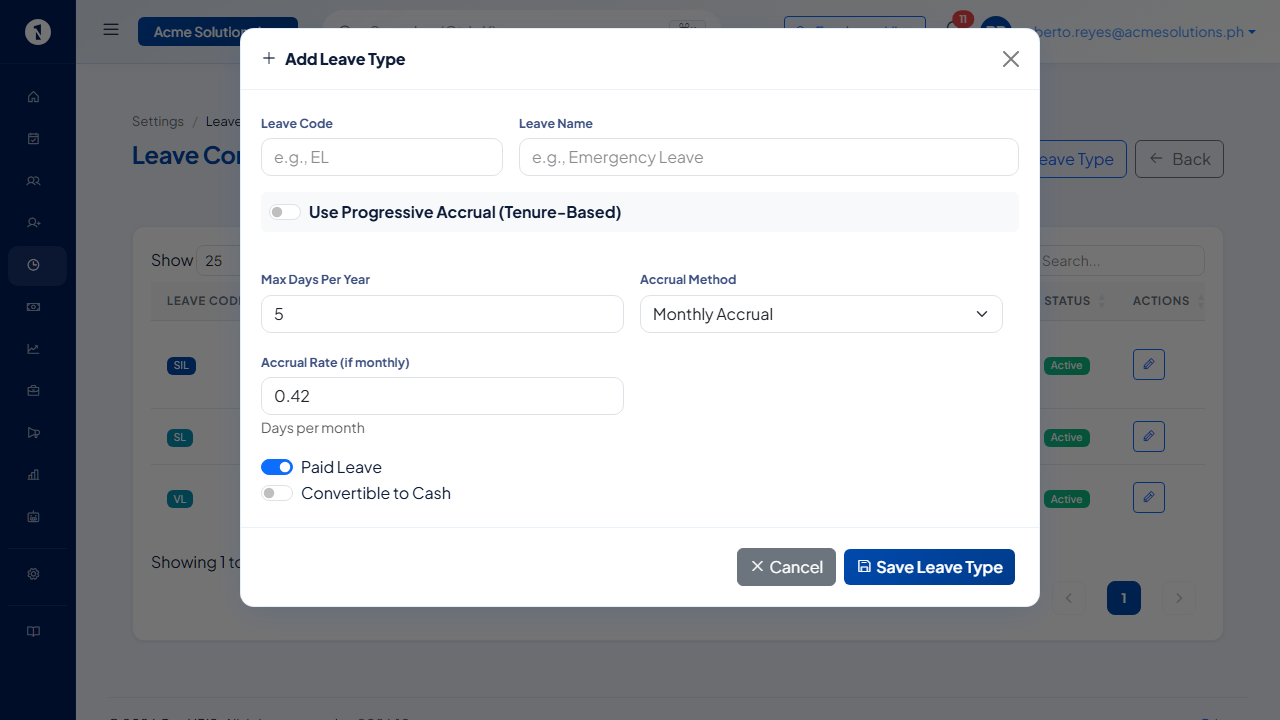 Leave code, name, max days per year, accrual method and rate, and whether it is paid and convertible to cash.
Set the entitlement rules
- Go to Settings and open Leave Policies. The page is titled Leave Configuration. Each leave type shows its Accrual Basis, Status and how many Rules it has.
- Select Configure on the leave type.
- In the entitlement table, which lists Applicability Scope, Entitlement, Method and Status, select the button to add a rule. The dialog is titled Add Entitlement Rule.
- Choose who the rule covers: Employee Type, Job Level / Rank and Department. Leave each on its "All" choice to cover everyone.
- Enter the Days Per Year.
- Choose the Method: Annual Lump Sum or Monthly Accrual. For monthly accrual, enter the Monthly Accrual Rate, usually the total days divided by 12.
- Select Add Rule.
Set the filing rules
The same page holds the rules for filing this type of leave:
- Minimum Advance Notice (days) and Maximum Advance Notice (days). Set 0 for same-day filing, and leave the maximum blank for no limit.
- Limit (days back) for retroactive filing. Leave it blank for unlimited.
- Min. Service to File (months) and Min. Service to Accrue (months).
- Accrual Starts From: Hire Date or Regularization Date.
- Minimum Duration (days) and Maximum Duration (days) for each request. For example, 0.5 for a half-day minimum.
- A medical certificate requirement, which applies only when the leave lasts longer than the number of days you set.
Check the result
Open Time, then Leave Balances, to see the credits. See check and adjust leave balances.
Questions people ask
What is the difference between a leave type and an entitlement rule?
A leave type is the category, such as Vacation Leave or Sick Leave. An entitlement rule says how many days a type of employee gets, such as 15 vacation days a year for Regular employees.
Can one leave type have different entitlements for different employees?
Yes. Add one rule for each combination of employee type, job level and department. A rule left on All Types, All Ranks or All Departments applies to everyone.
How is the entitlement given?
Each rule uses a Method: Annual Lump Sum, or Monthly Accrual with a monthly rate. The rate is usually the total days divided by 12.
Where do I set when accrual starts?
On the leave type's configuration page, under Accrual Starts From: Hire Date or Regularization Date.