
Set up a performance review cycle
A review cycle defines the period, the stage deadlines, who reviews each employee and how ratings are scored. Only a draft cycle can be edited.
Available on Pro Enterprise
Create the cycle
Open Performance, then Cycles, and select to create a new cycle. The page is titled New Review Cycle.
Basic info
- Cycle Name
- Type: Annual, Semi-Annual, Quarterly or Custom
- Period Start and Period End
- Reviewer Assignment Rule: Immediate Supervisor (direct manager), Department Head, or Department Head, Level 2 (parent department). It is used when reviews are generated for all employees.
- Description, optional
Stage deadlines
- Goal Setting Deadline, when employee goal encoding closes. Leave it blank for no cutoff.
- Self-Assessment Deadline
- Manager Review Deadline
- HR Approval Deadline
Rating scale and options
- Min Rating and Max Rating
- Enable Self-Assessment
- Salary Recommendation
- Employee Goal Setting, to let employees add their own goals
- Team Goal Scope: By Department, which cascades a goal to a department or all direct reports, or Free Select, where the manager picks individual subordinates per goal
- Scoring Template, which controls the score sheet formula and which parts appear
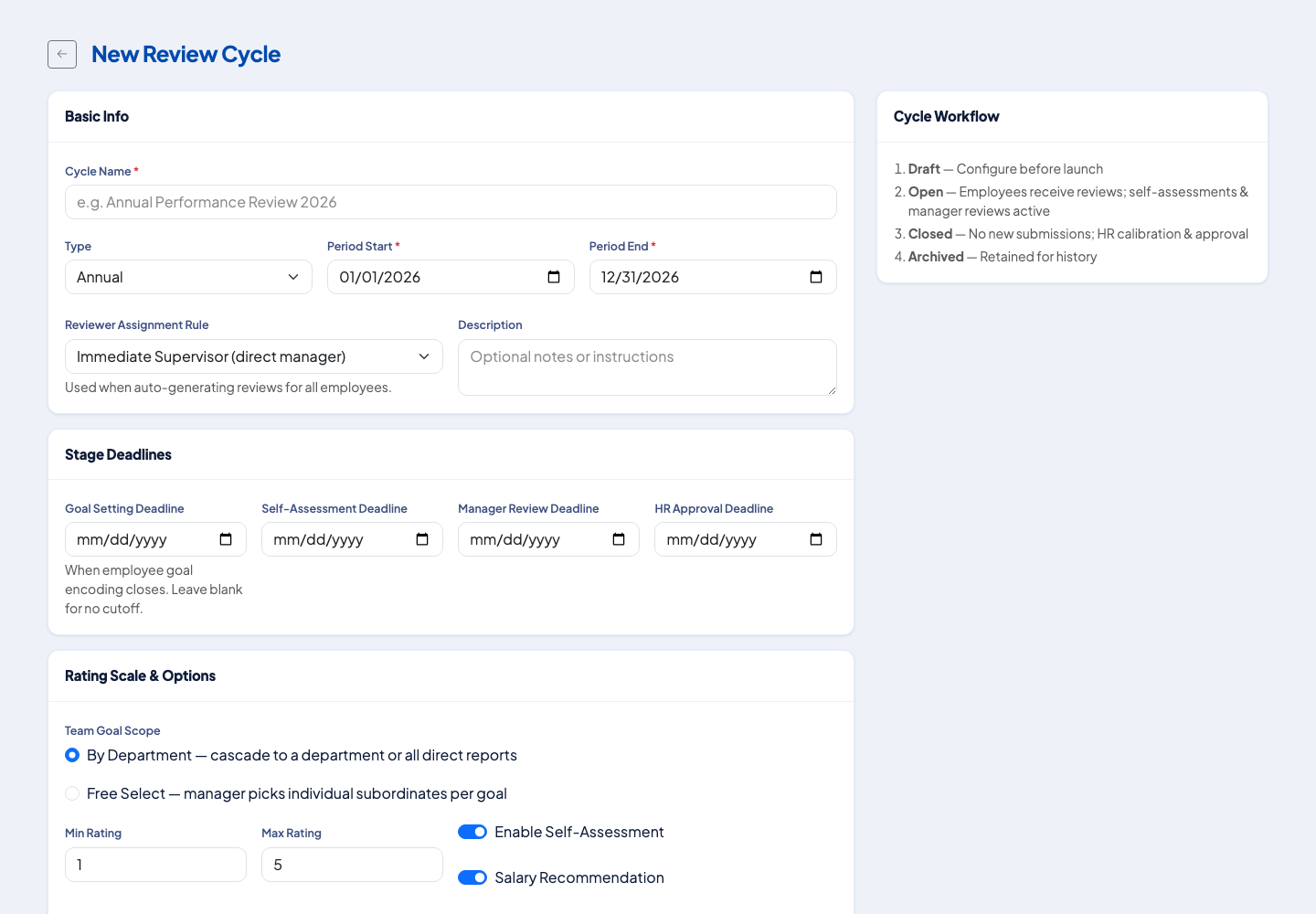 The cycle form. The Cycle Workflow panel beside it lists the four statuses.
Open and close
A cycle moves through four statuses: Draft (configure before launch), Open (employees receive reviews, self-assessments and manager reviews are active), Closed (no new submissions, HR calibration and approval) and Archived (kept for history). A cycle starts as a draft. Check everything, then open it from the cycle list. Close it when the reviews are done. A cycle that is not a draft cannot be edited, so settle the deadlines and the scoring template first.
Generate the reviews
Once the cycle is open, HR can create a review for every employee at once. The reviewer assignment rule picks each employee's reviewer from the same reporting chain used for approvals.
Next
Set goals for the cycle. See Set and weight performance goals.
Questions people ask
What cycle types are there?
Annual, Semi-Annual, Quarterly and Custom.
Who reviews each employee?
The reviewer assignment rule decides: the immediate supervisor, the department head, or the department head one level up.
Can I edit a cycle after it is open?
Only a draft cycle can be edited. Set it up fully before you open it.
Can employees write their own goals?
Yes, if the cycle has employee goal setting turned on.