
Set a regional minimum wage and update affected contracts
Enter a wage order by region and sector, preview which employees fall below the new floor, and generate draft contracts for approval. A distortion report shows what it costs to restore the gap between salary grades.
Open the page
Go to Settings and select Regional Minimum Wage. Each region with a wage order is listed with its tranches, effective dates and the previous and new daily rate for each sector.
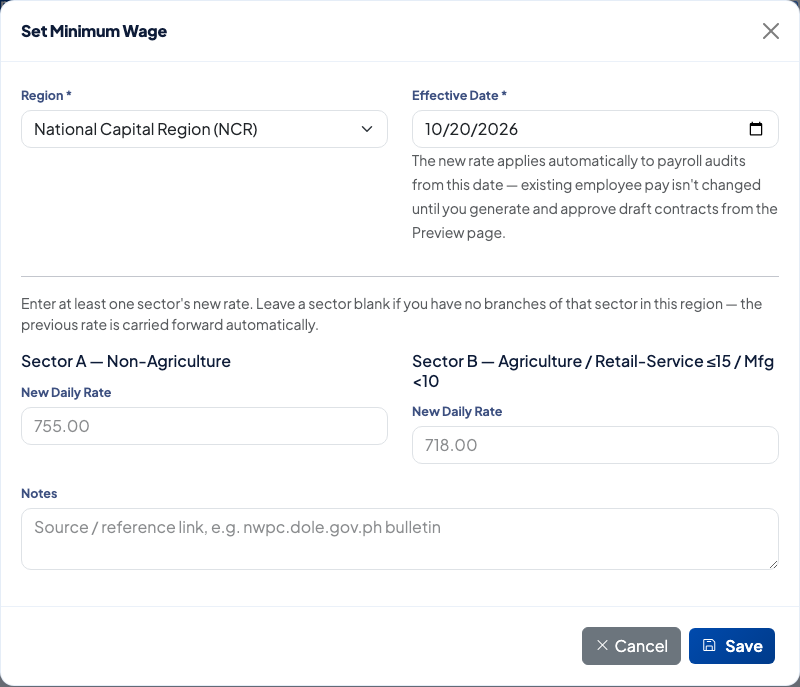 The Set Minimum Wage form takes one region, one effective date and the new daily rate for each sector.
Add a wage order
- Select Set Minimum Wage.
- Choose the Region. Only regions that have at least one branch appear.
- Set the Effective Date.
- Enter the New Daily Rate for Sector A, Sector B or both.
- Add the source in Notes, such as the NWPC bulletin.
- Select Save.
The new rate applies to payroll audits from the effective date. Existing employee pay is not changed yet.
Preview and generate draft contracts
Each tranche shows a Drafts badge: Upcoming, Effective — not yet generated, or Generated. Select Preview & Generate Drafts on a tranche.
The preview lists every employee paid below the new floor, with the current rate, current daily equivalent, new daily rate and new basic salary. Employees are ticked by default. Select Generate Draft Contracts to create a draft for each ticked employee.
The drafts have the status Pending. Nothing changes for an employee until the draft is approved under Contracts, then Pending Approvals.
Check the salary scale distortion
A wage floor can compress the gap between salary grades. Select Distortion Report on a tranche row to open the Salary Scale Distortion Report. It shows each pair of grades where the gap between them shrank, and by how much. The button appears on tranches the report applies to.
For each pair it offers three choices for the higher grade: Preserve % differential, Preserve peso differential, or No action. Each option shows the recommended rate and the employees who would change. Selecting Apply on an option generates draft contracts for those employees, and they go through the same approval.
Related
Questions people ask
Does saving a wage order change anyone's pay?
No. The new rate applies to payroll audits from the effective date. Employee pay stays the same until you generate draft contracts from the Preview page and they are approved.
Why does the page say no branches have a region?
Wage orders are set per region, and the region comes from each branch. Set the Region on each branch under Settings, then Branches, before adding a wage order.
Which sector do I fill in?
Sector A is non-agriculture. Sector B is agriculture, retail and service establishments with 15 or fewer workers, and manufacturing with fewer than 10. Enter at least one. A sector you leave blank keeps its previous rate.
What happens to an employee who already has a pending contract?
They are highlighted on the Preview page and cannot be selected. Resolve the other pending contract first, then run the generation again.