
Send an emergency alert and track employee check-ins
Trigger a safety check-in by push notification and email to all employees, a department or a branch, then watch responses arrive on a live dashboard and re-notify anyone who has not replied.
Available on Pro Enterprise
Before the first alert
Go to Settings and select Emergency Alerts. If no question set exists, a notice asks you to create one. Select Manage Question Sets and build a short check-in, for example "Are you safe?" with the answers OK, Need Assistance and Unable to Respond.
Trigger an alert
- Select Trigger Alert.
- Enter an Alert Title, such as "Flooding: Are you safe?".
- Add a Message. It is shown in the push notification and the email.
- Choose the Question Set.
- Choose the Scope: All Employees, Department or Branch.
- Select Trigger Now and confirm.
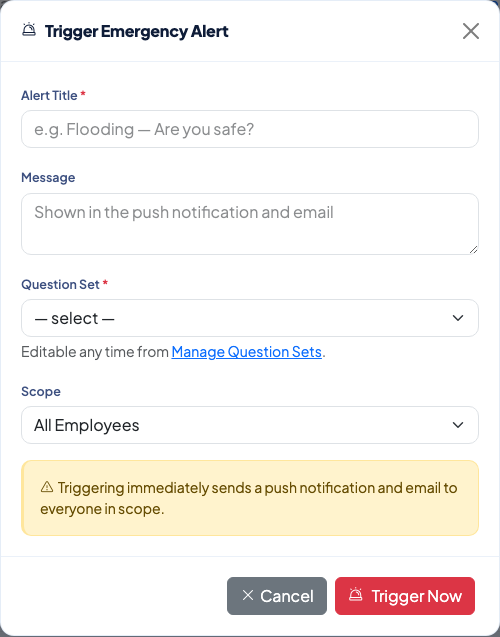 Triggering sends a push notification and an email at once to everyone in scope.
Watch responses
Select the alert to open its dashboard. It shows how many employees were Targeted, how many have Responded and how many are Not Yet Responded. The table lists each employee with their department, status, answer and the time they responded. Employees who have not replied are highlighted.
- Select Re-notify Non-Responders to send the alert again to employees who have not replied.
- Select Close Alert when the incident is over. Employees can no longer respond after that.
Related
Questions people ask
Do I need to prepare anything before the first alert?
Yes. Create a question set first, for example "Are you safe?" with the answers OK, Need Assistance and Unable to Respond. The page shows a notice until one exists.
Who receives the alert?
Everyone in the scope you choose: All Employees, a Department or a Branch. The push notification and email are sent as soon as you select Trigger Now.
Can I reuse a question set for another incident?
Yes. The incident details and the question set are separate, so you can edit a question set at any time and use it again for a new alert.
What happens when I close an alert?
Employees can no longer respond to it.