
Stop Chasing Signatures on Paper Memos
A signed memo is how Philippine employers prove an employee was told about a rule. Passing paper around branches and project sites is slow and easy to lose. Under the Electronic Commerce Act, an electronic signature can do the same job if it is captured the right way. OneHRIS now lets employees read and sign memos on their phone, tracks who has not signed, and files each signed copy in the employee's 201 file.
The memo routine every HR team knows
A new rule comes out: a safety requirement, a change in work hours, an updated code of conduct. HR writes the memo, prints it, and starts the rounds. A signature sheet goes from desk to desk. Copies go out to the branches and project sites. A week later, someone is still on leave, one branch sent back a photo of the sheet, and the original is in a folder nobody can find when a case comes up.
The memo itself takes an hour to write. Proving that every employee received it takes weeks.
What the signature is for
In the Philippines, a signed memo is how an employer shows that an employee was told about a rule. When a disciplinary case reaches the point of "you were informed," the signed acknowledgement is usually the first thing anyone asks for.
It helps to be clear about what that signature does and does not prove. Labor commentators point out that an acknowledgement proves the employee was informed. It does not make an unreasonable or unlawful rule valid. The signature is evidence of notice, not of agreement.
That matters for how you collect it. You need to know, for each employee:
- which version of the memo they saw, word for word
- that it was them who signed
- when they signed
- and, if they object, what their objection was
A signature sheet with a column of names and dates answers some of this. It rarely answers which version, and it says nothing about the employee who disagreed and signed anyway.
Electronic signatures are allowed
The Electronic Commerce Act of 2000 (RA 8792) gives electronic documents the same legal effect as paper ones. It also recognizes electronic signatures, as long as the signature can be tied to the person who made it and was made through a method the parties cannot alter afterwards.
In practice, that means an electronic acknowledgement is only as good as the record behind it. A button that says "I have read this" with no trace of who pressed it, when, or what text was on the screen is weak evidence. A record that keeps the exact text, the person's signature, the time and where it was signed from is much stronger.
As with any legal question, ask your counsel how this applies to your own policies, especially for documents that need notarization.
A read receipt is not an acknowledgement
Many teams already send announcements through chat groups or an internal portal and look at who has "seen" them. A read receipt tells you a screen was opened. It does not tell you the employee read the memo, understood it, or accepted it, and it is not a signature.
For a rule you may one day need to enforce, you want an actual signature on an actual statement.
How memo signing works in OneHRIS
We built memo signing into OneHRIS announcements so HR does not need a separate e-signature tool or a paper chase.
HR writes the memo once. In Settings > Announcements, HR creates the memo, picks who must sign it by department or position, and chooses the statement employees sign, for example "I, , agree to the terms set out in memo ." A sign-by date is optional.
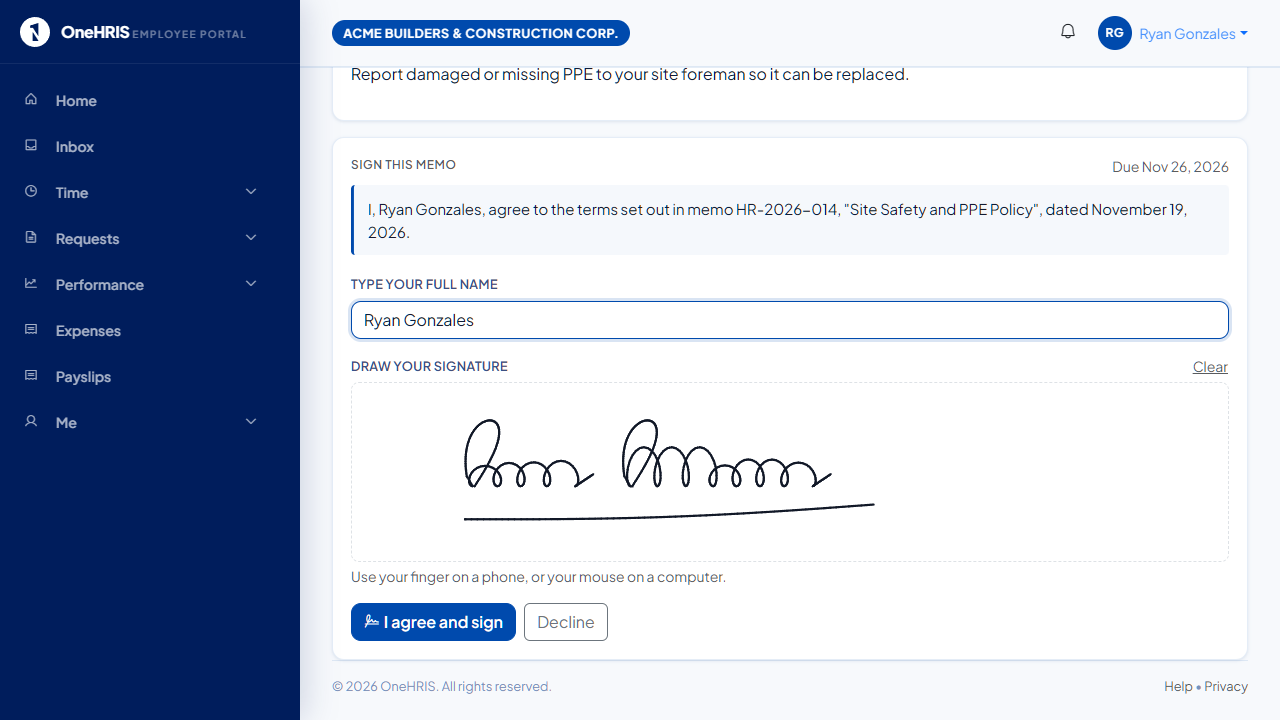
Employees sign where they already are. The memo shows at the top of their Home page and in their Inbox, and those on the mobile app get a push notification. They read it, type their name and draw their signature with a finger or a mouse.
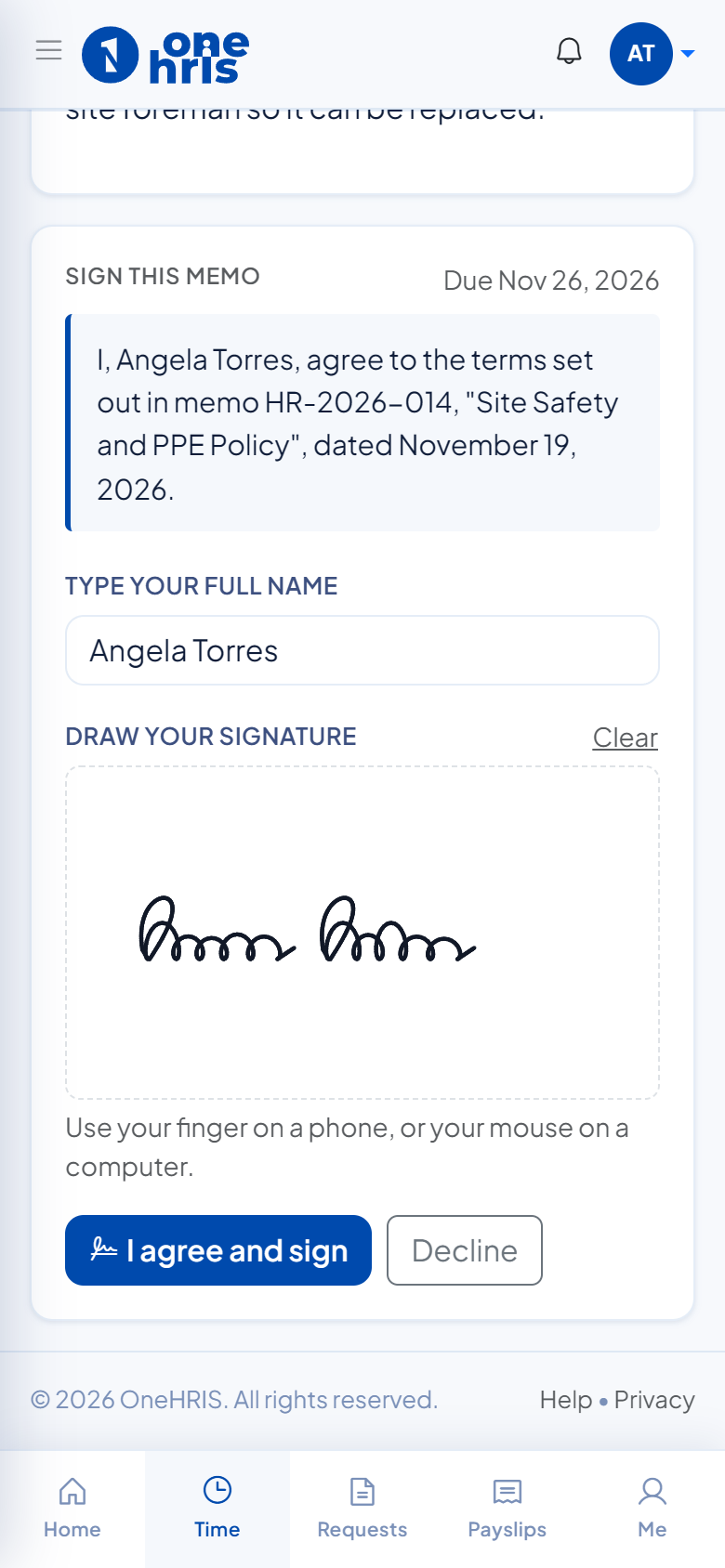
On a phone, it works the same way:
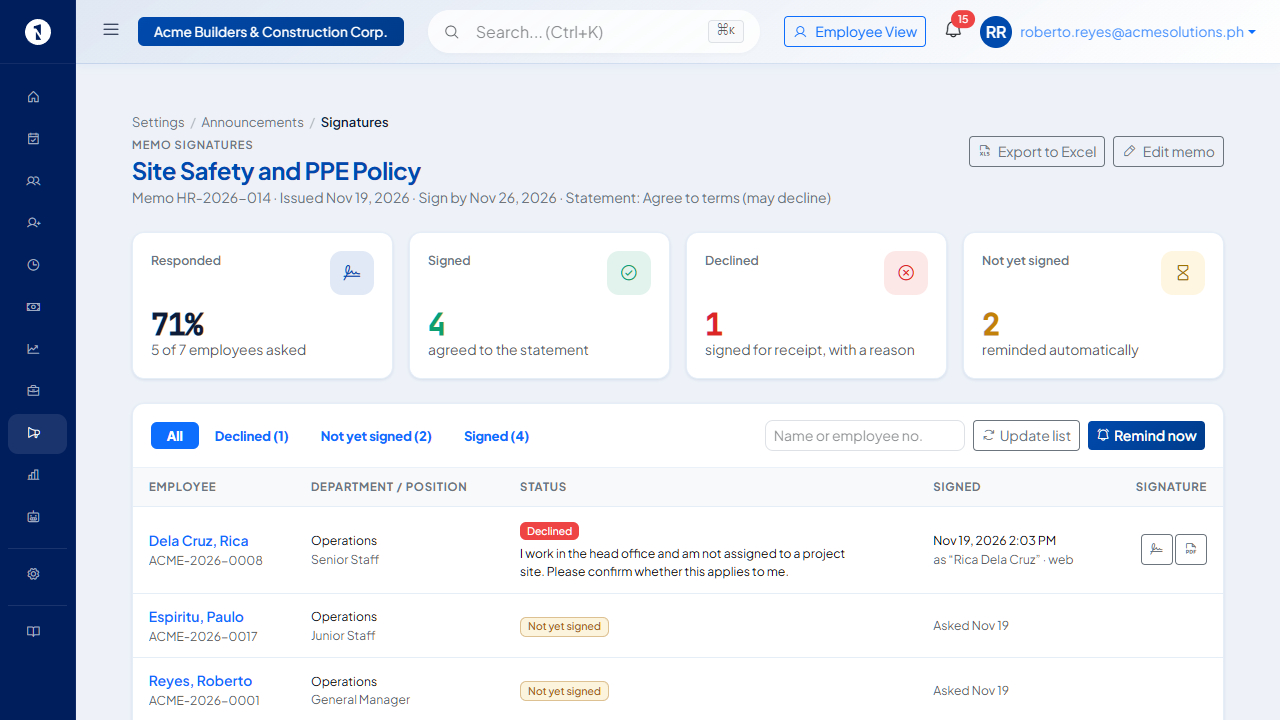
HR sees who has signed, without counting sheets. Each memo has a Signatures page: how many have responded, who signed, who declined and why, and who has not signed yet. Employees who have not signed are reminded automatically before and after the sign-by date, and HR can send a reminder on the spot.
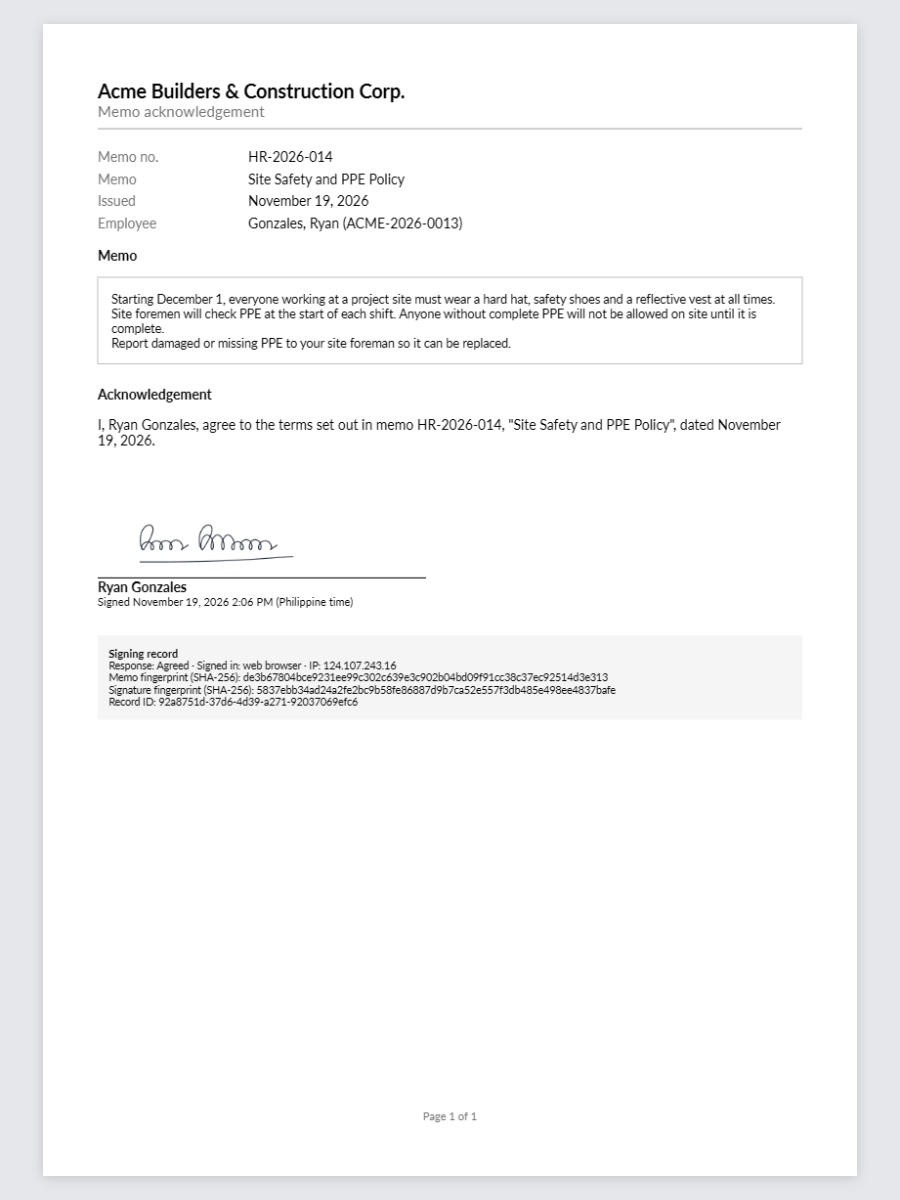
Every signature is filed with evidence. Each signed copy is saved as a PDF in the employee's 201 file. It carries the memo text, the exact statement signed, the drawn signature and typed name, the date and time in Philippine time, whether it was signed on the web or the mobile app, and fingerprints of the memo and the signature that show neither changed after signing.
Objections are recorded, not lost. If HR allows it, an employee can sign and decline with a reason. They still confirm they received the memo, and HR sees the objection next to their name instead of hearing about it months later.
The text cannot change after people sign. Once anyone has signed, the memo's wording is locked. If the policy changes, HR issues a new memo. Every signature on file points to exactly the text that employee saw.
Where to start
If you already use OneHRIS, memo signing is in Settings > Announcements. Pick one memo you would normally print, a safety rule or a schedule change, and send it to one department first.
- For HR: Send a memo that employees must sign
- For employees: Sign a memo in the Employee Portal
Questions people ask
Is an electronic signature on a memo valid in the Philippines?
The Electronic Commerce Act of 2000 (RA 8792) gives electronic documents and electronic signatures the same legal effect as paper ones, provided the signature can be tied to the person and the signing method cannot be altered by the parties. Ask your legal adviser how this applies to your own memos, especially anything that needs notarization.
Does an employee's signature mean they agree with the memo?
Not necessarily. A signature proves the employee received the memo. It does not make an unreasonable rule valid. That is why OneHRIS lets HR allow a decline with a reason: the employee still signs for receipt and records their objection.
What if an employee refuses to sign?
On paper, HR usually notes the refusal with witnesses. In OneHRIS the memo stays on the employee's Not yet signed list, they are reminded automatically, and HR can see exactly who was asked and when.
Can employees sign on their phone?
Yes. They open the memo in the OneHRIS mobile app or their phone's browser and draw their signature with their finger.
Where are the signed memos kept?
Each signed copy is saved as a PDF in the employee's 201 documents. HR can also download it from the memo's Signatures page, and the employee can download their own copy.
Sources
- Republic Act No. 8792, Electronic Commerce Act of 2000, Sections 7 and 8 (legal recognition of electronic documents and electronic signatures)
- LaborCode.ph, Is an Employee Handbook Legally Binding in the Philippines? (acknowledgement proves notice, not validity of the rule)